
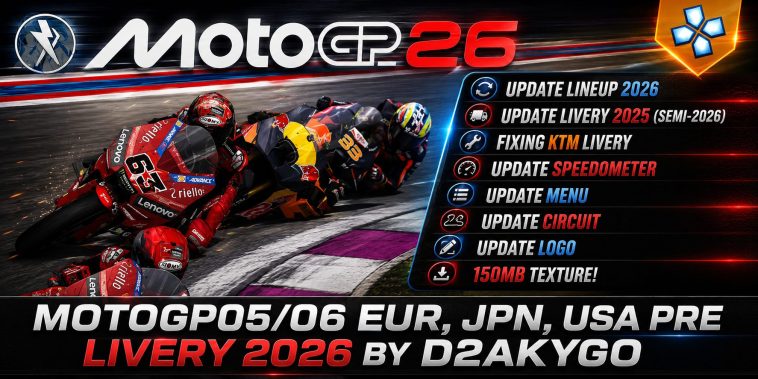
So when you see MotoGP EUR JPN USA Pre Livery 2026 PSP and wonder what it means, well, it refers to a modified PSP version of the classic MotoGP game released for PlayStation Portable in 2006, and official game the motorcycle racing game itself was developed by the Namco Bandai Game and was publish led for the PSP back in 2006 and was released for different regions, we are talking of Japan, USA and Europe, each distributed as separate⁶ UMD releases.
What you should know is that these regional versions are base files that modders use when rebuilding and creating a fresh update or visual change like the 2026 liveries. If you understand how these things work, you would know what to expect when getting a version of this mod.
The Original MotoGP PSP Game
When this game first dropped, it started with the PSP (those handheld consoles) version, players were able to race official motorcycles and compete against professional riders from the MotoGP championship. This version features some of the top drivers in the MOtocycling world of that time, notable names like Valentino Rossi and Sete Gibernau, these were some of the top stars of their era, the game also featured several real circuits from the championship calendar.
Players enjoyed playing different game modes, including the Single Race, Season mode, One on one mode, time trial, wireless multiplayer races and more, This multiplayer system supports up to 8 different devices using the PSP Ac Hod wireless connection, this one of those features that made this game stand out, back then if you see boys in a group with PSPs, you could easily tell this game was what all of them were playing. This game licensed, the motorcycles and riders are based on real MotoGP teams which gave it that extra depth of realism.
Why There Are Three Versions: EUR, JPN, and USA
So you may also be wondering why this game had three different versions, why not one version with different languages, well you must know that each region received its own version of the UMD disc. The three version were:
- Japan version
- USA version
- Europe version
These versions have their own release code and distribution date.
The Japan was released on August 24, 2006, the USA version released on September 27, 2006
And Europe released October 24, 2006. The differences in these releases were not much about game play, but more about localization.
For example, the European version has several language options such as English, French, German, Italian, and Dutch. The Japanese version on the other hand was of course Japanese language and it supported regional packaging.
But the gameplay itself was basically the same across the different versions.
Why Modders Use These Versions
You may be asking yourself, why do modders mention EUR, JPN, and USA when creating updates, and the answer is very simple, these versions are the original game bases. So these passionate developers have taken this base game and have added 2026 elements to it, so one can enjoy this two decade old game in 2026. The modders have modified the ISO files and have added some of these:
- Bike paint designs
- New team colours
- Rider suits
- Fresh Ui and graphics
And even new loading screens
These guys haven’t changed the main game play, but they have made very precise and deliberate tweaks, to make this game both feel more futuristic and realistic.
What “Pre Livery 2026” Means
Pre Livery 2026 basically refers to how modders describe early previews and versions of bike paint designs. When we are talking about a racing game, you can call it a particular visual design applied to a vehicle, in this case a motorcycle. Which includes the sponsor logos, team colours, and even the graphics to represent a racing team. When a mod is labelled pre livery, it means that the mod includes early versions of updated team graphics rather than final official designs. The updates are made by the community, they are not official MotoGP assets.
Bikes Included in the Original Game
The PSP motoGo game features some of the bad ass bikes back in the day, they felt like one of the best games one can actually produce, the motorcycles were based on real MotoGP machines from the mid-2000s era.
Let me list a few for you:
- Honda RC211V
- Yamaha YZR-M1
- Ducati Desmosedici GP5
- Suzuki GSV-R
- Kawasaki Ninja ZX-RR
So each of these bikes were special and had very different performance characteristics, some were speed, some had better acceleration and some other handling was their strong suit, you choose the one that matched your playing style.
Game Modes and Racing Experience
You are getting the modded version of this game from thor article, but the fast arcade racing nature of this game didn’t change a bi, you still get that physical driving experience. The racing system allows players to control acceleration, braking, and cornering while managing bike stability at high speeds. The track has different layouts, elevation changes here and there, and corner styles; players have to adjust their riding technique.
Game Sizes based on versions
The MotoGP PSP ISO files vary in size depending on the region, the size differences usually come from language packs and additional localization content.
- Japan version around 244 MB
- USA version around 241 MB
- Europe version around 300 MB
Installing MotoGP PSP ISO on an Emulator
You cannot run this game on your phone directly, you need an emulator, and the PPSSPP happened to be one of the best for so many years now.
First make sure you have installed the PPSSPP from the playstore, you can always go for the gold version if you are looking to get a premium experience.
Installation Steps
Installing these modded games are challenging to some and easy for others with experience, well let me put you through.
1. Use the link provided below the article to download the ISO version of this mod 2026 game.
2. Provided below the article.
3. Use the emulator file browser to locate the downloaded ISO file.
4. Run the game
5. You can tweak settings to fit your phone’s specifications.
Click Here to download all game files
Once these steps are completed you can go ahead and enjoy the game.