
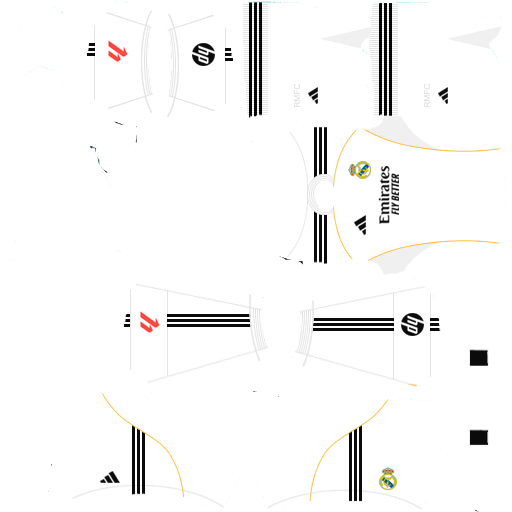
The Dream League has been one of the best mobile football games in a long time now. Whenever I want to relax, I just pick up my phone, open the DLS, and immediately enter my zone. Real Madrid kits 2026 for Dream League Soccer 2026 (DLS 26), Well if you are a regular player of the game like me, you would know that default kits of the game is actually okay, they are fine enough, but if we decide to be honest, nobody want to win the elite cup or the all star cup with that generic looking and unbranded jersey, and especially not with ones of Spain’s biggest clubs Real Madrid.
This 2026 football season, the Whites are looking very sharp and elite, with their new Bernabéu finally in play, the squad is looking better than it has been in so many years. As a DLS fan, it has been my dream to have a complete squad of a team like Real Madrid, Vini by the wing, Mbappe in Center, Jude Billingham in the midfield, Trent in right back, Courtois at the goal and Rudiger at Center Back. When I finally achieved this fit, something was missing, I was still using the default jersey with DLS on it, it was just a little off, and I was wondering, can this change?
So I opened google and I searched, ‘How can i get Real Madrid Latest kits for my DLS?’ I was in doubt when searching this one, but it slowly became one of my most useful searches in a long while. So yes, it is possible, and I will tell you all you need to know about getting it in this article.
The 2025-2026 Collection: A Quick Breakdown
This year Adidas did justice to the Real Madrid kit, they went for this MOdern Heritage vibe, the textures and those subtle nods is what make this jersey very special. As a true MArdi fan, if you don’t have this in your DLS game, you are failing your club.
Let’s look at the kits:
The Home Kit (Classic White): No one with football knowledge can deny the facts that the 25/26 Home kit is a masterclass we all know Madrid for it native white colour, this Home kit as always is predominantly white, but if you take a closer look, at the high-res DLS 26 version,, you would notice what I call Subtle Hounds tooth or geometric patterns, which is inspired by the Santiago Bernabéu design, we are talking of the exterior panels of the renovated stadium. They have brought back the yellow or I can call it gold trim as well, reminding me of the 2009-10 vibes, you know back when Ronaldo just arrived at the club.
The Away Kit (Night Skies):
For the away kits this spanish giants, took a very different dimension, its deep and dark navy or I can even call it Twilight blue, according to design, this is meant to represent the Madrid sky during the Noches Magicas in English Magic Nights in the Champions League. The design also features silver accents, and a green piping which I believe takes the colour of the grass. Well, as expected the kits loo so incredible in the DLS 26, when i first got it, It was my favourite of the three, I instantly feel in love with it, and I still like it so much till today.
The Third Kit (The Retro Trefoil):
Well aside for people like me that love the away kit, this third one has got so many people talking, Adidas the Jersey designers, used the original Trefoil logo instead of the standard performance logo for this one. We can call it the Blue bird shade of blue, which also takes me back to the 2013- 014 popular La Décima away kit, It also has the classic 90s collar, in fact any one can wear this kit to a casual place rather than a football match, that is the kind of vibes it gives, well you still get to enjoy this one on your DLS, playing live games would just be a whole new vibes.
Why You Need Custom Kits in DLS 26
Many might be asking, do I even need this custom kit? Well DLS 26 improved the graphics of the FIrst touch game from previous years, but the licensing is something that the have not gotten over, i still wonder why, all the clubs have a different game, different logo and kit. But if you want the real logos, the real sponsor on the kits (Emirates “Fly Better” and the HP sleeve logo), and the real patterns, you have no other choice but to import them, and that is the main reason for this article. The standard kit editor in the game is very limited, its like trying to paint a master art piece with wet potatoes, it just doesn’t work. You can only change a few colours and couple of styles, aside that you are stuck with that default kit. You make your team look unique, you need this.
How to Install Real Madrid 25-26 Kits in DLS 26
This is the part that gets many confused, if you have done this before, it will be a breeze, if you haven’t that’s why I am here to guide you. It is really easy and straightforward.
Step-by-Step Installation:
1. First, you need the link to the kit image file, You can find these links at the bottom of this article.
2. Open DLS 26: Go to the main menu and tap on the My Club icon and then go to customize Team
3. Edit Kit: Click on the Edit Kit, you would see a button on the left corner that says Custom Kits, if it is your first time, the game will ask you to unlock this feature with 150 gems, but its only a one time payment and you won’t need to pay it ever again.
4. Paste and Confirm: A box will pop up. Paste the URL you copied earlier into that box and confirm it, wait for it to be successful and that’s it.
Download All Kits Here
You might need to repeat the same process for your away, away, Third, and Goalkeeper kits.